
Choosing an ERP is one of the biggest technology decisions a growing business makes. For Canadian small and mid-sized businesses looking at Odoo, the first question is almost always the same: Odoo Community vs Enterprise — which edition is actually worth it? One is free and open source. The other is a paid subscription with more apps, official support and hosted options. On paper the choice looks simple. In practice, it depends on how you sell, how you account for GST/HST, how many people need access and how much in-house technical skill you have.
This guide breaks down the real differences between the two editions, the Canada-specific factors most comparison articles ignore, and what each option really costs once implementation and support are included. By the end, you will know which edition fits your business today and where you are likely to be in three years.
Odoo Community vs Enterprise: The Core Difference
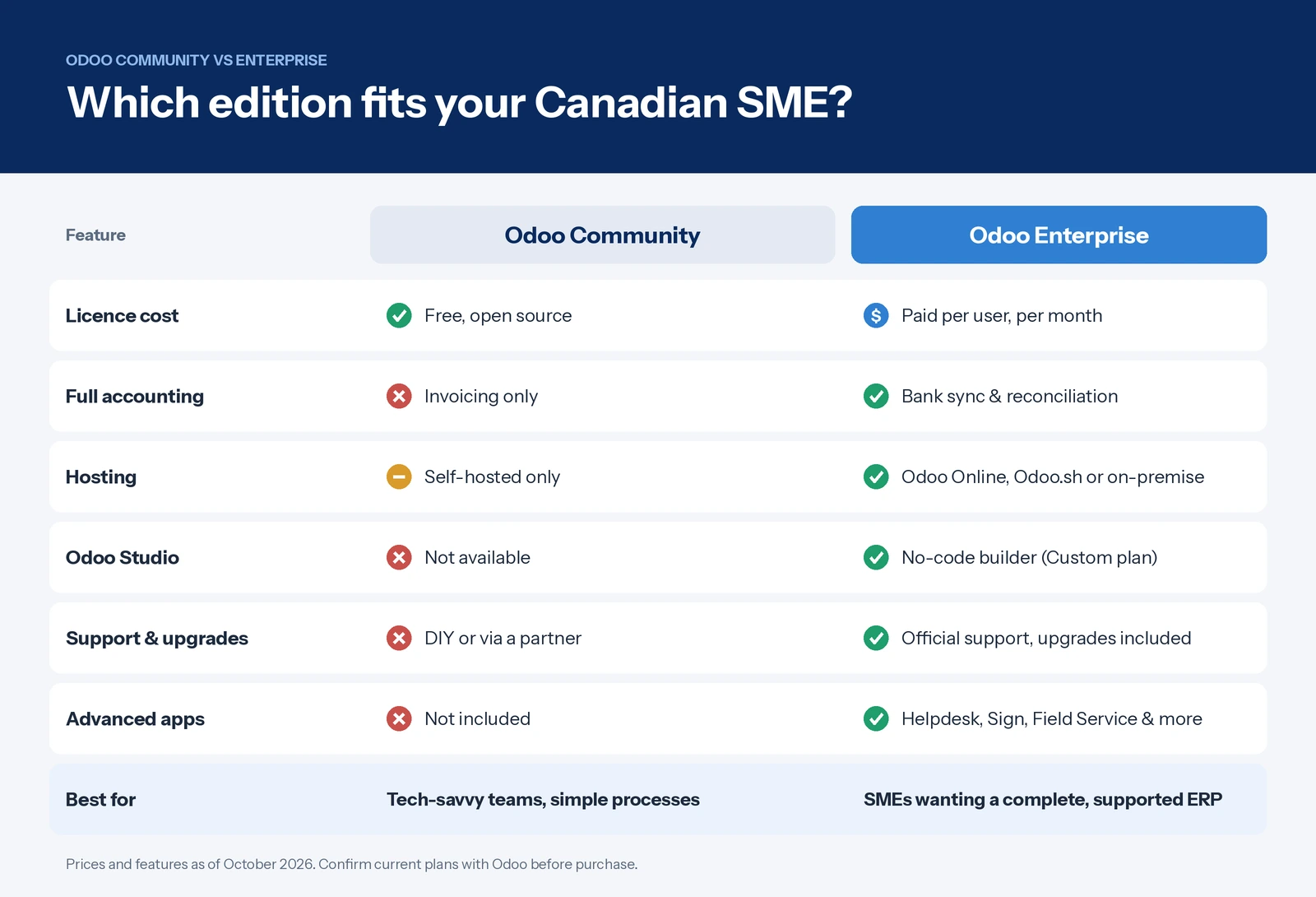
Both editions run on the same core framework. Odoo Community is the open-source base, licensed under LGPL, and free to download, host and modify. Odoo Enterprise is built on top of Community and adds proprietary apps, a polished mobile experience, Odoo Studio, official support and managed version upgrades. It is billed per user, per month.
Think of Community as a solid engine and Enterprise as the same engine with the full dashboard, extra features and a service warranty.
What Odoo Community Edition Does Well
Odoo Community is far more capable than many people expect. Out of the box, it covers CRM, Sales, Purchase, Inventory, basic Manufacturing, Project, Website, eCommerce, Point of Sale, Employees and Invoicing. For a small distributor, retailer or service firm with straightforward workflows, that can be enough to replace a patchwork of spreadsheets and disconnected tools.
The big advantages are cost and control. There are no licence fees, you can host it wherever you like and you own the code. A large ecosystem of community modules, many maintained by the Odoo Community Association (OCA), fills common gaps.
Where Community Falls Short
The limitations show up quickly for most growing SMEs:
- Accounting is limited. Community handles invoicing, but full accounting features such as automated bank feeds, advanced reconciliation and detailed financial reporting are Enterprise features. Replicating them with third-party modules adds risk and maintenance work.
- No official support. When something breaks, you rely on your own team, a partner or community forums.
- Upgrades are on you. Moving between major Odoo versions requires migrating data and custom modules yourself, which can be a significant project.
- Fewer productivity apps. Helpdesk, Documents, Sign, Planning, Field Service, Quality and Marketing Automation are not available.
- A weaker mobile experience, which matters for field staff and warehouse teams.
What Odoo Enterprise Adds
Odoo Enterprise turns the platform into a complete business management system. Its main advantages are:
- Full accounting with bank synchronization, automated reconciliation, multi-currency support and financial reports your accountant will recognise.
- Odoo Studio, a no-code tool for adding fields, building screens and automating workflows without hiring a developer (available on the Custom plan).
- Flexible hosting through Odoo Online (fully managed SaaS), Odoo.sh (managed cloud with custom code) or on-premise.
- Official support and upgrades, so moving to each new version is handled rather than rebuilt.
- Industry-ready apps for manufacturing (PLM, Quality, Maintenance), services (Helpdesk, Field Service, Planning) and back office (Documents, Sign, Approvals).
For most SMEs, the real value is not any single feature. It is having one supported system where sales, inventory, accounting and operations share the same data.
Canadian Factors That Change the Decision
Generic comparisons are usually written for European or US businesses. Canadian SMEs face a few extra considerations that often tip the balance.
GST/HST, PST and QST Compliance
Canadian sales tax is complex. A business selling across provinces may need to charge GST, HST, PST or QST depending on where the customer is located. Odoo’s Canadian localization provides a chart of accounts and tax setup, but filing-ready tax reports, automated reconciliation and fiscal position rules work best within Enterprise accounting. If you sell into multiple provinces, Community will likely need extra modules or a separate accounting tool.
Bilingual Operations
Both editions support Canadian French and English. For businesses in Quebec, or those serving Quebec customers, the ability to issue invoices, quotes and customer communications in French is essential under the Charter of the French Language. Enterprise makes this easier to maintain across apps, documents and the customer portal.
Data Privacy and Residency
Under PIPEDA, and Quebec’s Law 25 in particular, you are accountable for where personal information is stored and how it is protected. With Community, you choose your own hosting, so keeping data in a Canadian cloud region is straightforward. With Enterprise, confirm the hosting location for Odoo Online or Odoo.sh before you sign, or opt for on-premise or partner hosting in Canada.
Payroll and Banking
Most Canadian SMEs run payroll through a dedicated provider, then post journal entries into the ERP. Enterprise accounting simplifies this integration and supports bank feeds for reconciling transactions. Check which Canadian banks connect directly before you commit, as coverage varies.
Odoo Enterprise Pricing in Canada and the True Cost of “Free”
Odoo bills Canadian customers in CAD. As of mid-October 2026, published rates on annual billing are roughly C$44 per user per month for Standard and C$73 per user per month for Custom, with promotional first-year rates of about C$35 and C$58 respectively (OEC.sh Canada pricing tracker). Odoo adjusts prices regularly, so always confirm in the official pricing configurator before budgeting.
Licence fees are only part of the picture. Here is an indicative annual comparison for a 10-user Canadian SME:
| Cost item (10 users, per year) | Community | Enterprise Standard | Enterprise Custom |
|---|---|---|---|
| Licences (list price, CAD) | C$0 | ~C$5,280 | ~C$8,760 |
| Hosting | C$500–C$3,000 (your own cloud) | Included (Odoo Online) | Odoo.sh or own cloud, extra |
| Support and upgrades | Partner or in-house, often C$5,000+ | Included | Included |
| Custom modules to fill feature gaps | Often significant | Limited (no custom code) | Moderate, plus Studio |
Implementation is a separate, one-time cost for either edition. Quebec partner estimates put a near-standard Odoo rollout at around C$12,000 to C$20,000 for configuration alone, with data migration, training and integrations on top (Octura Solutions). Community projects frequently cost more here, because developers must rebuild features that Enterprise already includes.
The takeaway: Community saves on licences but shifts cost to development, maintenance and upgrades. Over three to five years, Enterprise is often the cheaper option for SMEs without an in-house development team.
Which Odoo Edition Is Right for Your Canadian SME?
There is no universal answer, but clear patterns emerge.
Choose Odoo Community If…
- You have fewer than 10 users and simple processes, such as basic sales, inventory and invoicing.
- You keep accounting in a separate tool, such as QuickBooks Online or Sage, and only need operational modules.
- You have in-house developers, or a trusted partner, to manage hosting, security and upgrades.
- Full control over code and Canadian data residency matters more than convenience.
Choose Odoo Enterprise If…
- You want one system for accounting, GST/HST/QST reporting, inventory, sales and operations.
- You sell across several provinces or need bilingual documents for Quebec customers.
- You plan to grow beyond 10 to 15 users, or expect to add manufacturing, field service or helpdesk.
- You would rather pay for support and upgrades than build and maintain them.
A Practical Middle Path
Many Canadian SMEs start with Enterprise Standard on Odoo Online to get live quickly with minimal IT overhead. As requirements grow, they move to the Custom plan for Studio, custom modules and integrations. Starting on Community and migrating later is possible, but moving data and custom modules between editions adds cost, so it pays to choose with your three-year plan in mind.
Conclusion: Making the Right Call
The Odoo Community vs Enterprise decision is less about free versus paid and more about where you want to spend your money and effort. Community suits small, technically capable teams with simple needs. Enterprise suits Canadian SMEs that need complete accounting, multi-province tax compliance, bilingual operations and a supported upgrade path. For most growing businesses, the time saved and risk avoided make Enterprise the better long-term investment.
Whichever edition you choose, a successful rollout depends on the right setup from day one: tax configuration, data migration, integrations and staff training.
Ready to Choose the Right Odoo Edition?
Our Odoo specialists help Canadian SMEs assess their needs, compare editions and implement Odoo with confidence. Book a free consultation and get a clear recommendation tailored to your business.