Canada has about 1.1 million businesses with employees, and 99.7% of them are small or medium-sized (ISED, Key Small Business Statistics). Many still run on QuickBooks or Sage, a separate inventory tool, spreadsheets and a lot of re-keying. That works until you add a second warehouse, start selling into the U.S., or face a month-end close that takes two weeks. A well-planned Odoo ERP implementation in Canada replaces that patchwork with one system for accounting, sales, inventory, purchasing, manufacturing and CRM.
This guide is written for owners, CFOs and operations leads at Canadian SMBs. It covers what Odoo costs in Canadian dollars, how it handles GST, HST, PST and QST, a realistic implementation timeline, typical budgets, the mistakes that derail projects, and how to choose the right implementation partner.
Why Canadian SMBs are choosing Odoo
Odoo wins with growing Canadian businesses because it scales from a few apps to a full ERP without a change of platform, at a per-user price that includes every app.
- One price, all apps. On the Standard and Custom plans, a user pays the same whether they use CRM only or accounting, inventory, manufacturing and HR together. There are no per-module fees to negotiate.
- Start small, grow into it. Many SMBs begin with accounting, sales and inventory, then add manufacturing, field service, e-commerce or helpdesk later on the same database.
- Real-time numbers. Sales orders, stock moves, vendor bills and payments post to the general ledger as they happen, so month-end close shrinks from weeks to days.
- Built for cross-border trade. Multi-currency is standard, which matters for businesses buying or selling in USD.
- Open source core. The Community edition is free and open source, so you are never locked into a single vendor’s roadmap.
- Modern user experience. Staff adopt Odoo faster than legacy ERPs because the interface looks and feels like the web apps they already use.
The common trigger points we see: outgrowing QuickBooks or Sage 50, adding a second location or warehouse, launching e-commerce, starting light manufacturing, or preparing the books for investors or a sale.
Canada-specific requirements your implementation must cover
Odoo’s Canadian localization handles sales tax, the chart of accounts and Canadian bank payments out of the box; payroll is the one area that needs a separate plan.
| Requirement | What Odoo provides | What to plan for |
|---|---|---|
| GST, HST, PST, QST | Canadian localization with a predefined chart of accounts, tax rates and default fiscal positions for every province and territory (Odoo docs) | Map each customer to the right fiscal position; tax follows the province of delivery, not your head office |
| Complex or multi-province tax | Avalara AvaTax integration for Canada and the U.S. | Worth it if you ship to many provinces or into U.S. states |
| CRA-ready reporting | Canadian balance sheet, P&L and tax reports, filed monthly, quarterly or annually | Agree the tax report layout with your accountant before go-live |
| EFT and cheques | CPA005 EFT payment files for Canadian banks, Canadian cheque layouts, Stripe pre-authorized debits | Confirm your bank’s EFT file specs early |
| Payroll (CPP, EI, T4, ROE) | No official Canadian payroll localization in core Odoo | Integrate a Canadian payroll provider, or scope a custom payroll module with T4 and ROE output |
| USD and cross-border | Native multi-currency, automated exchange rates, landed costs | Decide how FX gains and losses are posted and who reviews them |
| French language (Quebec) | Full French interface and translatable documents | Customer-facing invoices, quotes and emails in French for Quebec customers |
| Privacy and data location | Choice of Odoo Online, Odoo.sh or self-hosting | Review PIPEDA and provincial rules (e.g. Quebec Law 25); choose hosting that meets your data-residency policy |
Payroll is where Canadian projects most often go wrong. Settle it in the discovery phase, not the week before go-live.
Odoo editions and pricing in Canadian dollars
Most Canadian SMBs land on Standard (about C$44 per user per month at list price, billed yearly) or Custom (about C$73) once they need Studio, multi-company or custom code.
| Plan | List price, billed yearly (CAD) | Hosting | Best for |
|---|---|---|---|
| Community | Free licence | Self-hosted only | Businesses with in-house developers who accept no official support |
| One App Free | C$0, unlimited users | Odoo Online | Testing a single app, such as CRM or Invoicing |
| Standard | ~C$44 per user per month | Odoo Online | SMBs that can run on standard workflows |
| Custom | ~C$73 per user per month | Odoo Online, Odoo.sh or on-premise | Multi-company groups, custom modules, integrations via API |
Prices are list rates for Canada as tracked by OEC.sh in October 2026; Odoo regularly runs first-year promotions below list, and multi-year terms change the rate. Add GST/HST or QST on top. Always confirm current pricing with Odoo or your partner at the time of purchase.
Which hosting model? Odoo Online is simplest and cheapest but does not allow custom modules. Odoo.sh adds Git-based development, staging environments and custom code. Self-hosting on a Canadian cloud region gives full control over data location, but you own upgrades, backups and security.
Step-by-step Odoo implementation roadmap
A focused SMB rollout goes live in about 15 weeks, followed by a month of hypercare.
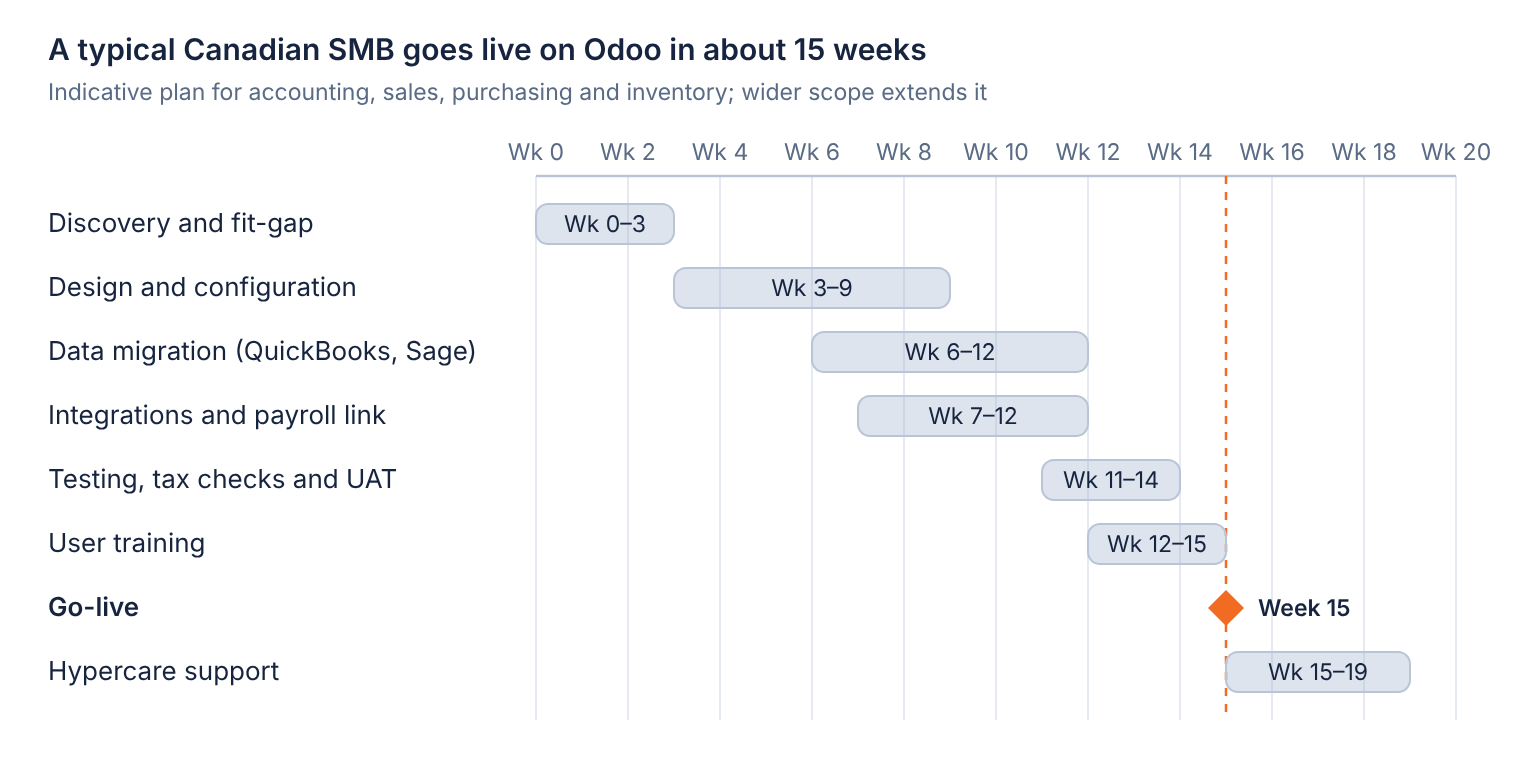
- Discovery and fit-gap. Map current processes, confirm which Odoo apps you need, and document gaps. Decide on payroll, hosting and data-residency now.
- Design and configuration. Configure the chart of accounts, fiscal positions, warehouses, routes, pricelists, approval rules and user rights. Keep customization to the gaps that matter.
- Data migration. Clean and import customers, vendors, products, open invoices and bills, stock on hand and opening balances from QuickBooks, Sage or spreadsheets.
- Integrations. Connect payroll, banks (EFT/CPA005), e-commerce, shipping carriers and any industry tools.
- Testing and UAT. Run real scenarios end to end, including a mock GST/HST return and a month-end close, before sign-off.
- Training. Train key users first, then everyone else on their own daily workflows.
- Go-live. Cut over at the start of a month or quarter, with opening balances reconciled to your old system.
- Hypercare. Daily support for the first weeks, then a post-go-live review to prioritize phase-two improvements.
How much does Odoo implementation cost in Canada?
For most Canadian SMBs, licences are the smaller part of year one; implementation services, data migration and training make up the bulk of the budget.
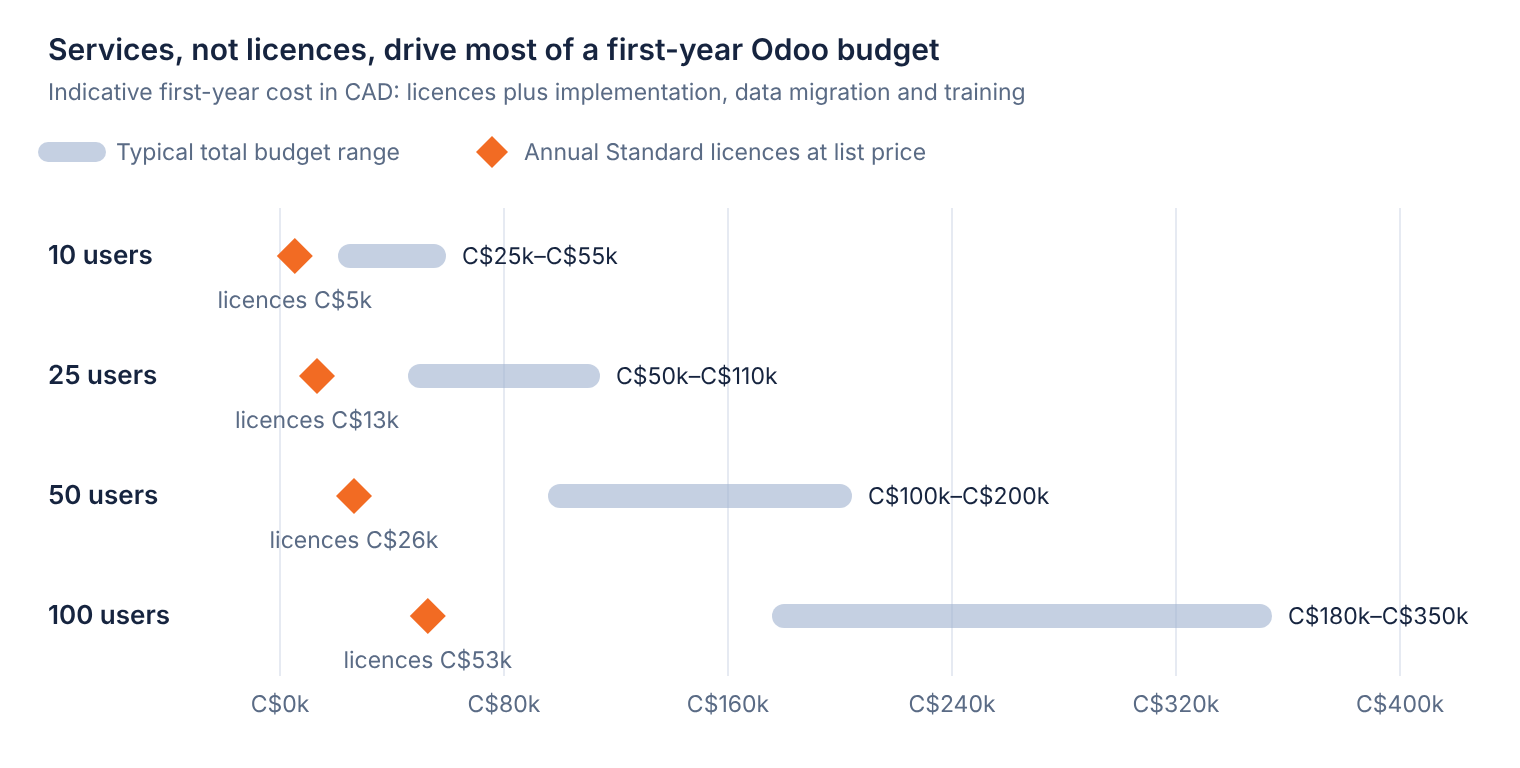
The ranges above are indicative and assume Odoo Standard with a typical scope. Five factors move your number up or down:
- Number of apps and processes in scope at go-live versus later phases.
- Customization and integrations, such as payroll, e-commerce, EDI or shipping connectors.
- Data quality and volume in your current system.
- Hosting choice: Odoo.sh or self-hosting adds infrastructure and Custom-plan licences.
- Training depth and change management, especially across multiple sites.
After year one, ongoing costs are mainly licences plus an optional support retainer, which is usually far below the cost of maintaining a legacy ERP.
Want a budget range for your business? Book a free Odoo readiness assessment and get an itemized estimate within a week.
Where Odoo fits best in Canada: industry use cases
Odoo delivers the fastest payback in businesses that move physical goods or bill for project time.
| Industry | Typical Canadian pain point | Odoo apps that solve it |
|---|---|---|
| Wholesale and distribution | Stock spread across warehouses in Ontario, Quebec and B.C.; manual reorders | Inventory, Purchase, Barcode, multi-warehouse routes, landed costs |
| Light manufacturing | Bills of materials in spreadsheets, no real product cost | Manufacturing, Quality, Maintenance, PLM, shop-floor tablets |
| E-commerce and retail | Online store, POS and accounting out of sync | Website, eCommerce, Point of Sale, Shopify or Amazon connectors |
| Professional services | Unbilled hours, slow invoicing | Project, Timesheets, Planning, recurring invoicing |
| Field and trade services | Paper work orders, delayed billing | Field Service, Helpdesk, mobile app, on-site signatures |
| Food and agri-food | Lot traceability and expiry tracking for CFIA recalls | Lots and serial numbers, expiry dates, traceability reports |
| Cross-border exporters | USD pricing, customs costs, FX exposure | Multi-currency, pricelists per market, landed costs, AvaTax |
Seven mistakes that derail Odoo projects in Canada
Most failed implementations fail on scope and data, not on software.
- Customizing before standardizing. Every custom module adds cost at each annual upgrade. Adapt your process to standard Odoo first; customize only what gives you a real edge.
- Leaving payroll to the end. Odoo has no native Canadian payroll. Decide on an integrated provider or a custom module during discovery.
- Getting tax set-up wrong. Wrong fiscal positions mean wrong GST/HST on invoices and painful corrections at filing time. Have your accountant review tax mapping before testing starts.
- Migrating dirty data. Duplicate customers, obsolete SKUs and unreconciled balances carry their problems into the new system. Clean and de-duplicate before import, and migrate open balances rather than years of history.
- Choosing a go-live date that fights your calendar. Avoid fiscal year-end, peak season and the weeks before a GST/HST filing. Many Canadian SMBs go live at the start of a quarter.
- Under-investing in training. Staff who only see Odoo at go-live will build spreadsheets around it. Train key users early and make them internal champions.
- Picking a partner on price alone. A cheap quote that skips discovery usually becomes an expensive change-order list. Compare partners on Canadian experience and method, not just day rates.
How to choose an Odoo implementation partner in Canada
The right partner has implemented Odoo for Canadian companies like yours and can show it. Use this checklist when comparing proposals:
- Official Odoo partner status, with certified consultants on the team
- Reference clients in Canada, ideally in your industry and province
- Hands-on experience with GST/HST/PST/QST fiscal positions and CRA reporting
- A clear answer on Canadian payroll: which provider they integrate, or how they build it
- Bilingual capability if you sell in Quebec
- Fixed-scope discovery phase before a full implementation quote
- A data migration plan from QuickBooks, Sage or your current system
- Support hours that overlap your time zone, from Atlantic to Pacific
- Post-go-live support and annual upgrade plan, priced up front
- Help identifying provincial programs that may offset costs, such as Ontario’s OCI DMAP or Quebec’s ESSOR
On funding: the federal Canada Digital Adoption Program (CDAP) ended on March 31, 2025, and no federal grant has replaced it. Some provincial programs and BDC financing can still support ERP planning or implementation; check eligibility before you sign, because several programs reject costs committed before you apply (GrantCompass, October 2026).
Frequently asked questions
How long does an Odoo implementation take in Canada? A focused SMB rollout of accounting, sales, purchasing and inventory typically takes 12 to 20 weeks. Manufacturing, multi-company or heavy integrations can extend it to six to nine months.
Does Odoo handle Canadian sales tax correctly? Yes. The Canadian localization includes GST, HST, PST and QST rates and a fiscal position for each province and territory. Your partner maps customers and products so the right tax applies to each invoice.
Can Odoo run Canadian payroll? Not natively. Most Canadian SMBs connect Odoo to a Canadian payroll provider and post payroll journal entries automatically, or commission a custom module that calculates CPP, EI and income tax and produces T4s and ROEs.
Can we migrate from QuickBooks or Sage 50? Yes. Customers, vendors, products, open invoices, open bills and opening balances migrate cleanly. Most businesses keep detailed history in the old system as a read-only archive.
Is Odoo Community enough for a small business? It can be, if you have in-house technical skills. Most SMBs choose Standard or Custom for official support, automatic upgrades and enterprise-only apps such as full accounting reports and Studio.
Where is our data stored? That depends on the hosting model. If data residency matters to you, discuss Odoo.sh regions or self-hosting on a Canadian cloud region with your partner.
Conclusion: plan your Odoo ERP implementation in Canada with confidence
A successful Odoo ERP implementation in Canada comes down to three things: a clear scope, Canadian tax and payroll handled from day one, and a partner who has done it before. Get those right and a growing SMB can replace a patchwork of tools with one system in a single quarter, at a fraction of the cost of legacy ERPs.
Ready to see what Odoo would look like for your business?
Book a free 45-minute Odoo readiness assessment with our Canadian ERP team. We will review your current systems, flag your GST/HST and payroll requirements, and give you a realistic timeline and budget range. No obligation, no sales pitch.
Book your free Odoo assessment →
Not ready to talk yet? Request the Odoo Implementation Checklist for Canadian SMBs and share it with your team.
Pricing, tax and funding details are current as of November 2026 and may change; confirm with your partner before purchase.